Complete GoreBox Commands Guide
Watch and follow every GoreBox v16 console command with our complete video guide covering syntax, permissions, Creator Mode, and practical examples.
This guide pairs a full video walkthrough with written reference material for every GoreBox v16 console command. Whether you are opening the console for the first time or optimizing a Creator Mode sandbox, the video demonstrates each command live while this page explains when and why to use them. Commands are the fastest path to healing, flight, weapon skins, motion recording, and server-wide event banners — all prefixed with a forward slash and typed after pressing C on PC.
Start with our console basics page if you have never opened the command line. Return here when you want visual confirmation of syntax, argument order, and permission requirements that text alone cannot convey. The video covers general utilities, host commands, stat overrides, Reality Crusher tools, and developer utilities like /navgenerate.
Search intent for this guide is straightforward: you want every GoreBox command demonstrated in one sitting without scrubbing random YouTube timestamps. Use the written sections below as a table of contents — jump to host commands before an MPMod event, or skip to RCV2 tools when building contraptions on Workshop maps.
How to Follow the Video
Load GoreBox in Creator Mode on any map — Legacy works well for open testing space. Pause the video at each command segment, type the command exactly as shown, and observe the result before continuing. Pay attention to capitalization on skin names: /setSkin Mighty requires a capital M. Host-only commands like /heal and /timer need Creator Mode or host status; the video labels permission tiers on screen.
Keep our all commands list and Command Lookup tool open in a second tab for copy-paste during practice sessions. After watching, drill the motion recording trio — /rstart, /rstop, /replay — documented in depth on our motion recording page.
Essential Commands Covered
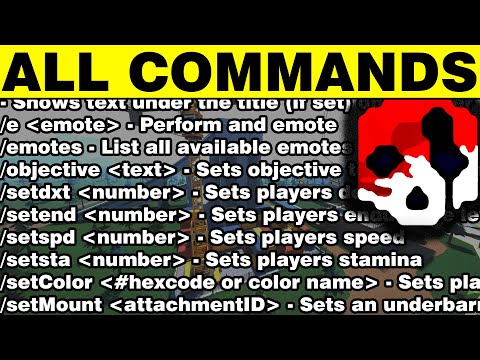
The walkthrough demonstrates /help for live command discovery, /divine for sandbox flight and invincibility, weapon customization via /setMount, /setShield, and /setScope, and gym stat setters /setdxt, /setend, /setspd, /setsta. Host event commands /title, /objective, and /timer appear in a dedicated segment for players running custom scenarios.
Reality Crusher precision tools /rs and /ps adjust rotation and position snap grids — essential for contraption builders using RCV2 modes. Developer commands /openConsole and /navgenerate close the video for addon authors fixing GoreDoll pathing on Workshop maps.
Post-Video Practice Plan
After completing the video, run a structured ten-minute drill: open console, run /help, apply /setSkin Mighty if unlocked, toggle /divine for thirty seconds of flight testing, then practice /rs 45 and /ps 2 while placing ten props with Reality Crusher Link mode. End with a motion recording cycle on Legacy to cement the /rstart workflow.
Share your practice checklist with friends who use MPMod so everyone understands which commands require host status before joining a session. Consistent command literacy reduces downtime during community events and makes recorded content look professional when hosts trigger /title and /timer on cue.
Common Mistakes & Fixes
If commands return "unknown command," verify you are on v16, using a forward slash prefix, and not typing removed legacy commands like the old Observer jumpscare. Keyboard conflicts with connected racing wheels can block the C key at menus — disconnect extra controllers on Windows before troubleshooting.
Guests in unofficial multiplayer via MPMod cannot run host commands. Use singleplayer Creator Mode for unrestricted testing. Boss fights strip Toolgun access — /give Toolgun fails during Observer until the fight ends. See beat the Observer for fight-specific restrictions.
Build a personal command cheat sheet after watching: group utilities, host tools, stat setters, and RCV2 helpers on separate lines you can paste from notes. Practicing ten minutes daily in Creator Mode cements syntax faster than rewatching the full video. Share timestamp links with friends so your group uses identical /timer and /title strings during hosted events.
Video Walkthrough
Related in Guides
Subscribe to Workshop addons inside GoreBox.
Android Mod InstallationSideload addons with ZArchiver on mobile.
Custom GoreDollsEdit body and hair textures for custom ragdolls.
Multiplayer Mod (MPMod)Unofficial online play after official removal.
Port Custom MapsImport community maps with addon compatibility.
Beat the ObserverBlueprint routes and Mighty weapon tips for v16.
Map Editor BasicsCreate and export your first custom GoreBox map.
Frequently Asked Questions
What key opens the GoreBox console?
Press C on PC while in-game. Mobile support for advanced commands is limited.
Does this video cover v16 commands?
Yes. The guide targets GoreBox v16. Always verify with /help after major patches.
Where is the written command list?
See our complete commands reference and Command Lookup tool.
Can I use divine mode during boss fights?
No. Boss fights override inventory and restrict creator powers including /divine.
How do I record commands for a YouTube video?
Use /freecam for camera angles and /rstart with /replay for entity motion capture.